GitHub Admin
PREVIEW / DRAFTNOT LIVE YET

Open source · MIT · Free games

Gather round
one screen.

Game Table turns a touchscreen lying flat on the table into a board that everyone in the room shares. Phones are the private hands. And the games? You build them, with your AI, in hours.

1–8 players per tableNo app to installAI players built inRuns on your own network
0to build your own game
0playable out of the box
0to join
0of lobby code in your game

About

Human players first.

Game Table began with a do-it-yourself game table that friends built, and with a love of board games. Klaus and those friends kept coming back to one idea: a game platform designed for the people at the table, helped by computer graphics and a referee that never tires. The rules are observed automatically, and the chores, like setting up the board and keeping the game moving, happen by themselves. What matters is the people playing together.

The idea

  • The table is the centrepiece. One shared touchscreen in the middle, and each player's phone as a private deck for the games that hide cards, like poker.
  • Remote players, on the side. Friends far away can join, but there is no video, voice or chat in the game, on purpose. Talk to them the way you already do, with Google Meet or FaceTime running alongside.
  • AI players fill the seats. Mainly so that a game that needs a certain number of players can start at all.

The code

  • Prompted, not typed. The ideas went to Claude, and Claude Opus 5.5 developed all of the code, step by step. Every decision is in the decision records: who asked, why, and how it was built.
  • A platform, and games from anywhere. The platform and its lobby are separate from the games, with clear ways to bring in games from other repositories that fit the table.
  • The table stays at home. The game service's lobby lets remote players find their game through an invite link, without the game table itself being exposed to the internet.
  • Open. The project is hosted by Klaus's engineering company, Skylar Technology, and every source for a complete game runtime and development environment is public on GitHub.
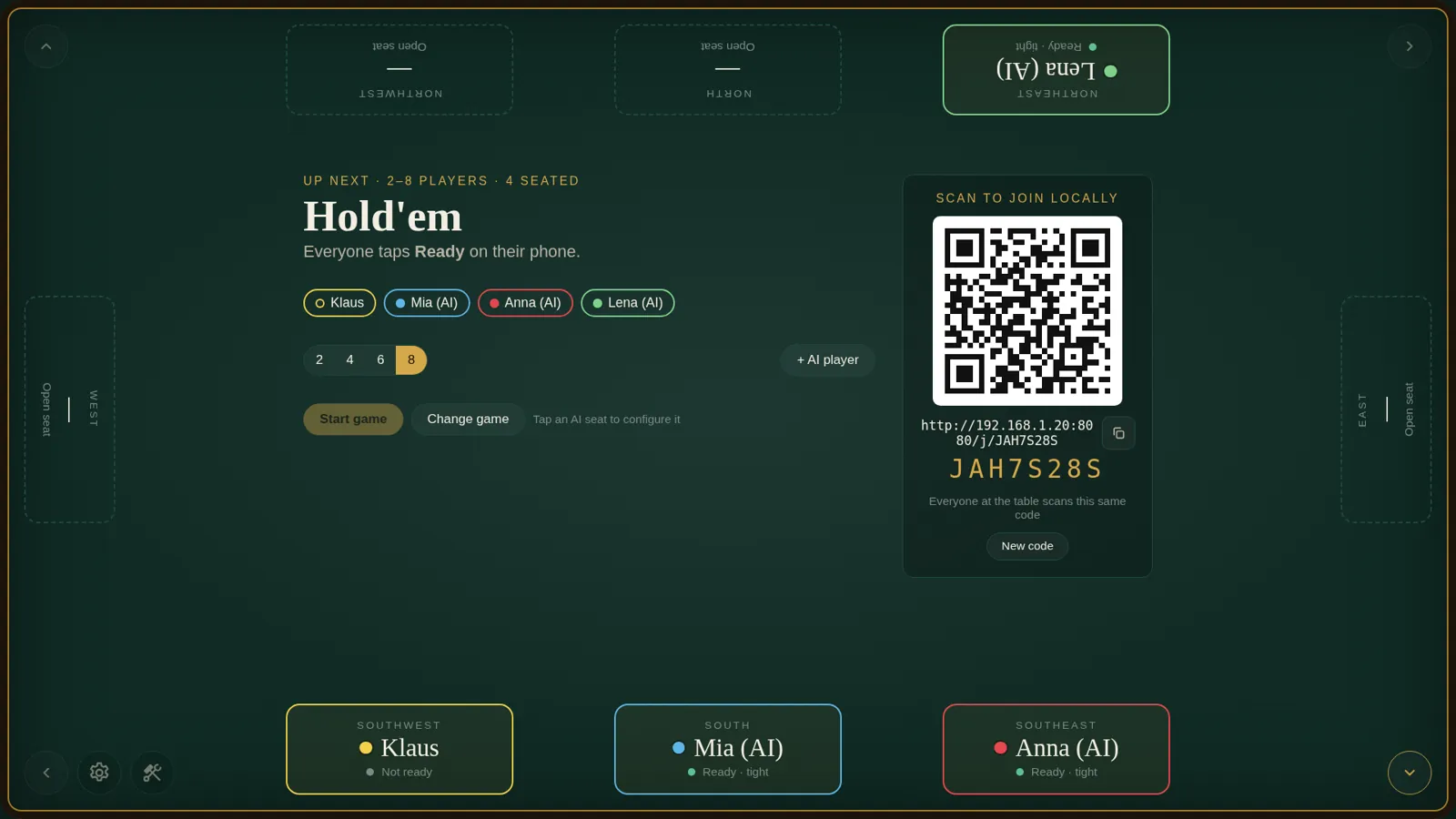
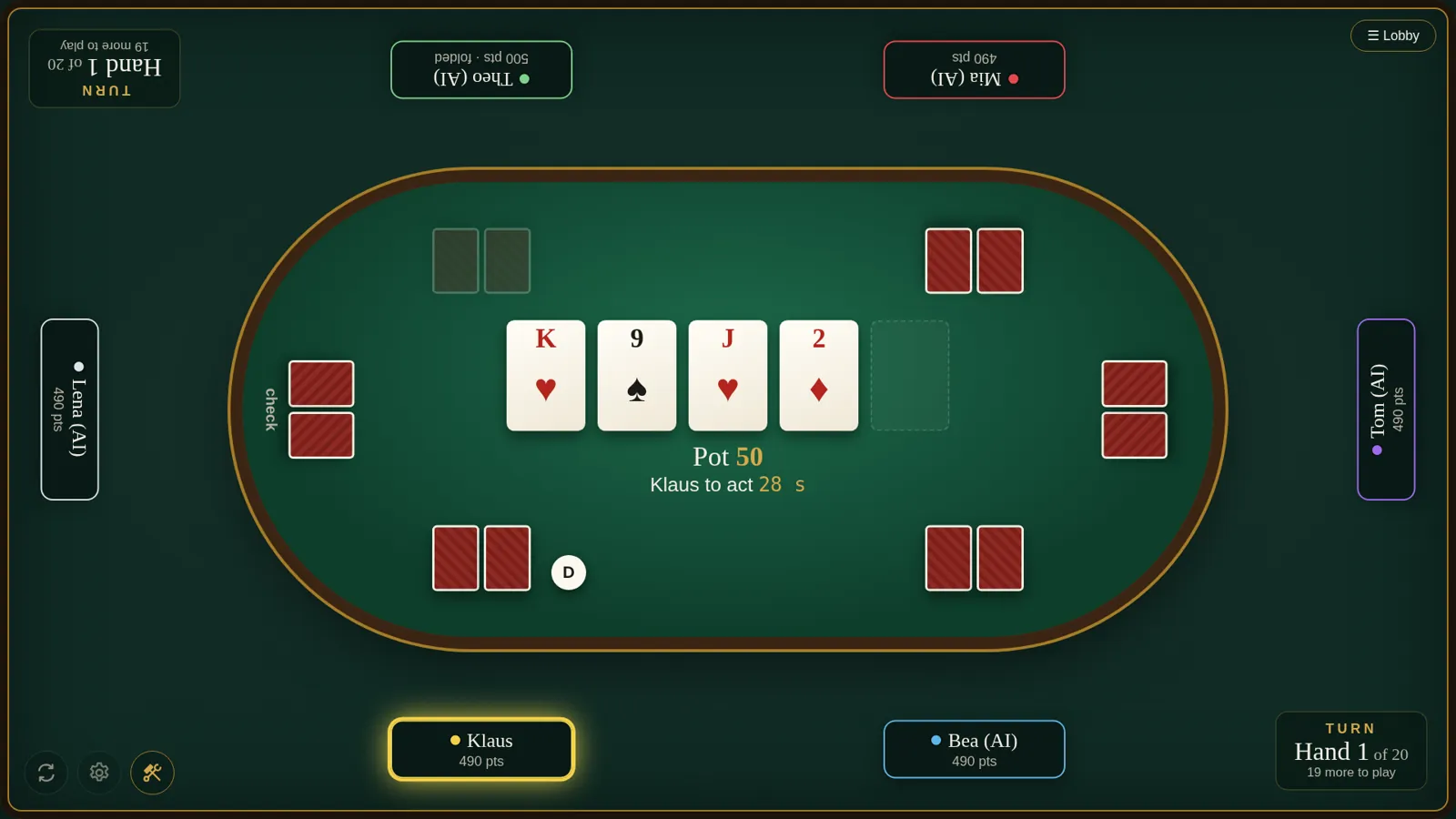
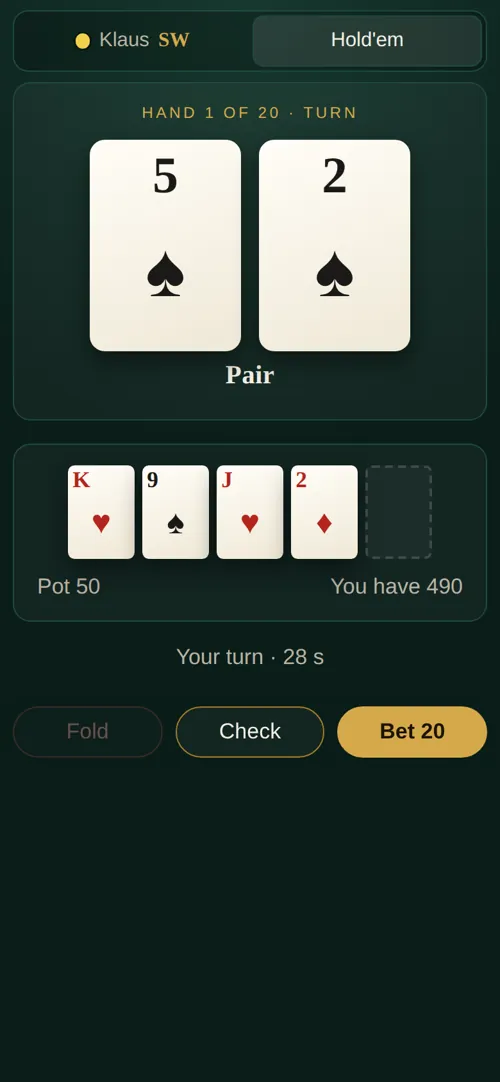
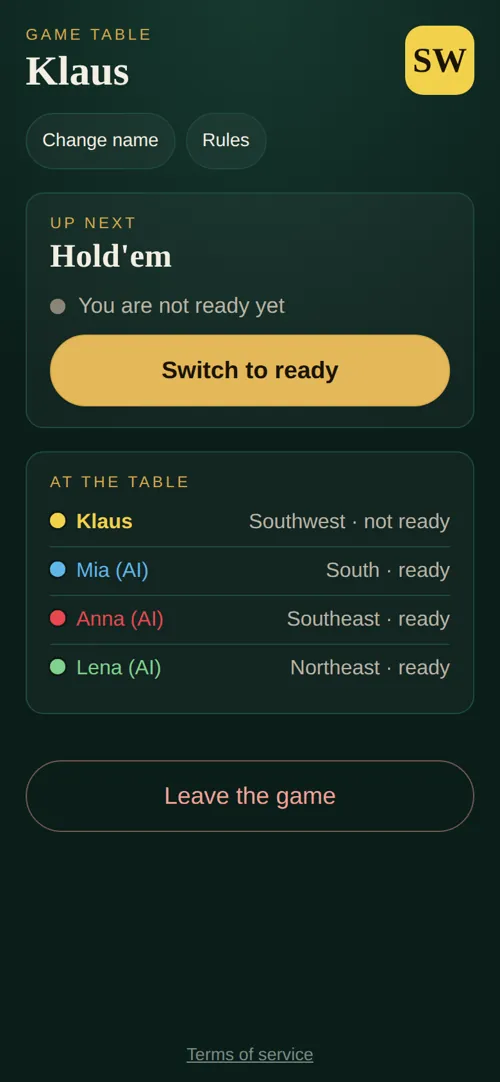
The board's lobby: seats around the edges, the chosen game, and a QR code to join A phone showing a player's two private cards

Made for the room

Real people, one table, no one staring at a TV.

1

The board lies flat in the middle

A touchscreen everyone can reach: dice roll, cards slide, pieces move under your finger. Each seat has its own edge, and the board turns its text toward whoever is playing.

2

Your phone is your hand

Scan the QR code and you have a seat. No app and no account. Your cards, dice cup and bets stay on your phone; the table sees only what it should.

3

Empty seats? Add an AI

Every game ships with AI players, some with several styles. They play at the board's pace and wait for the animations, so they feel like people at the table. Some bring in strong engines: Backgammon has wildbg, and Chess can ask Stockfish or the Lichess cloud.

Someone couldn't make it? Send an invite link. They see the same board in their browser with their own deck beside it, connected straight to your table. Up to four can join from afar, as players or as watchers.

Free games

Nine games, a synthesizer, a guitar pedal, and room for yours.

Four games come with the platform; five more come from extra-games, a separate repository that shows how anyone can add games. And from synth-game, something for one: a pocket synthesizer to play on the board. Electric guitar players with a Mooer GE150 Pro pedal get its remote control from ge150pro-game. All of them are free and play for points, never money.

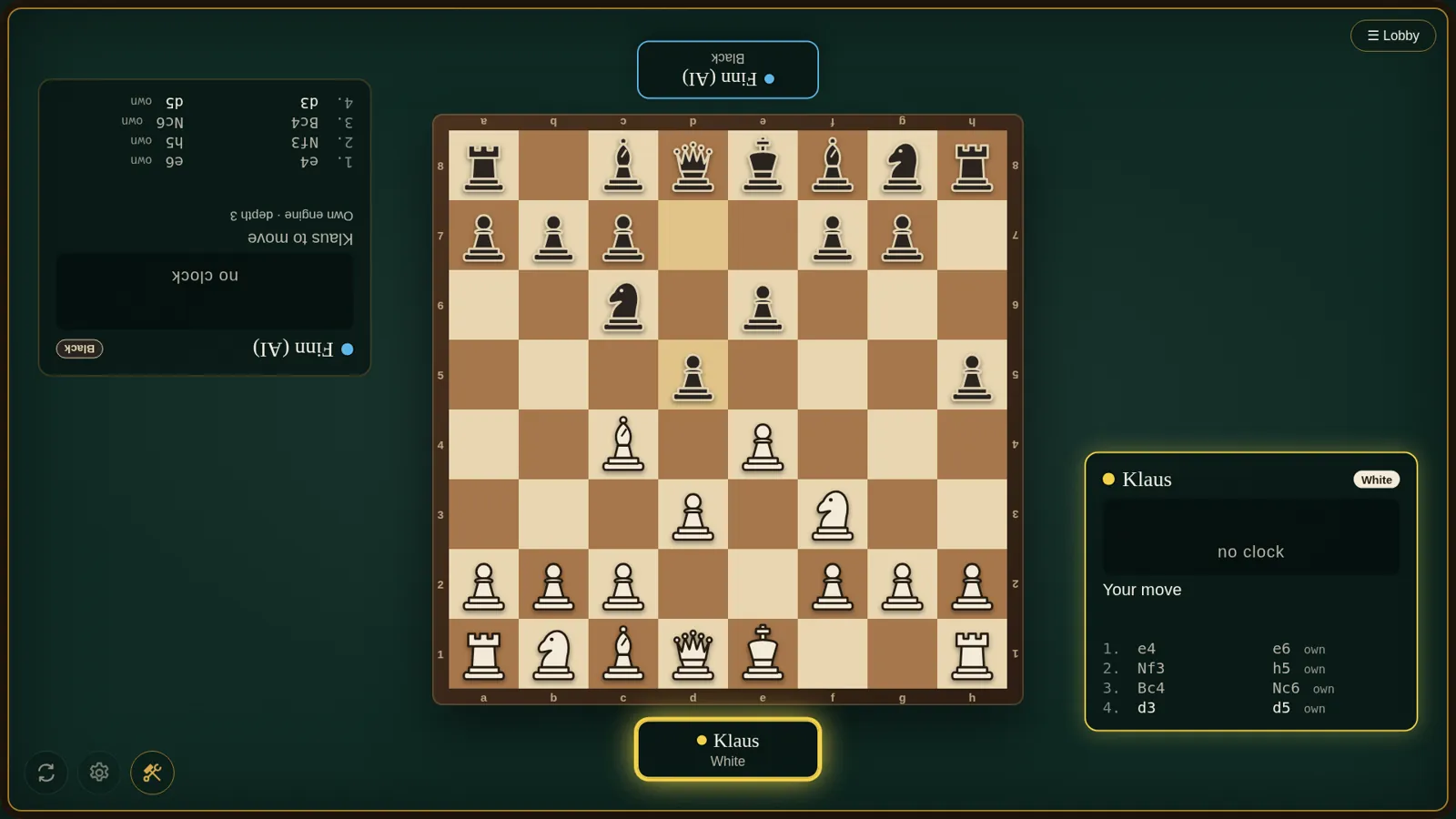
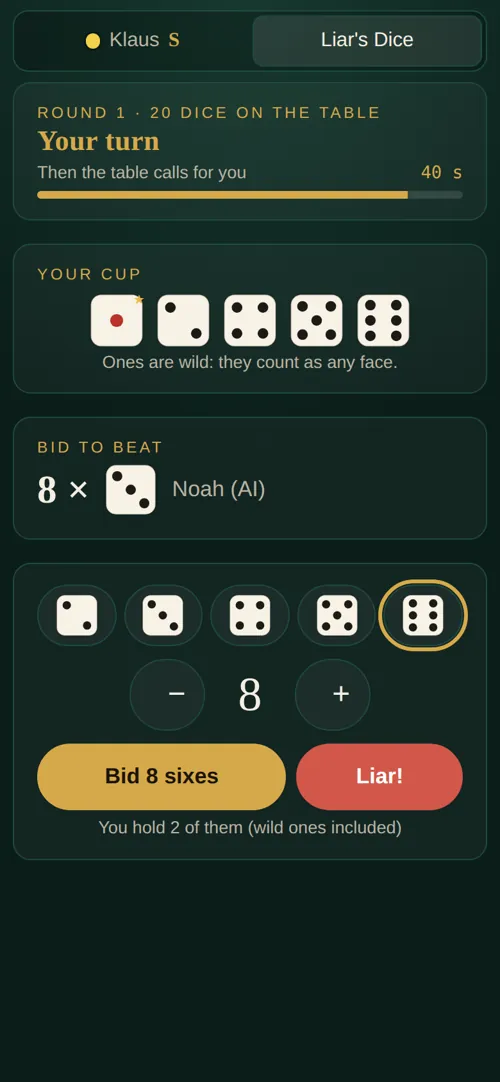
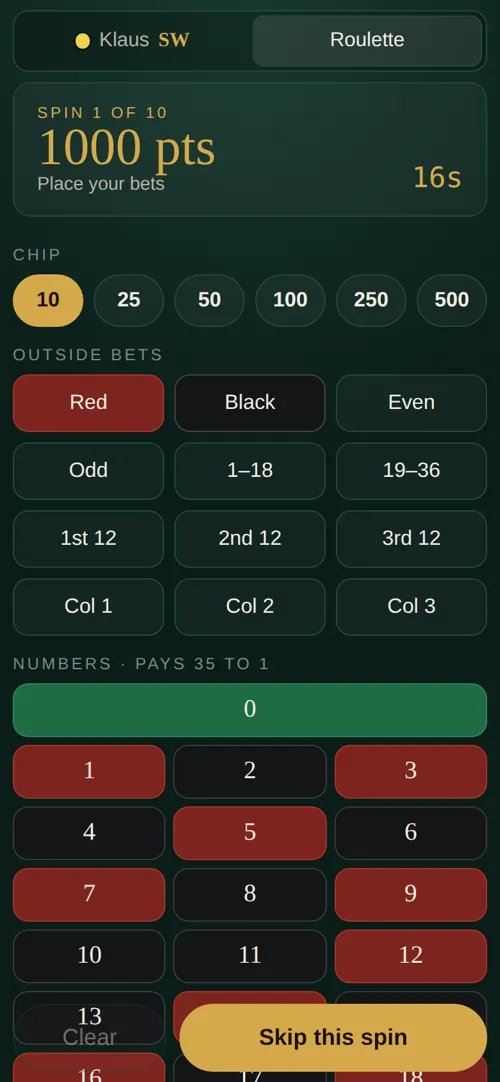
Click a game for a closer look. Every screenshot is the real board, taken by the platform's browser tests.

Statistics and awards

Every game ends with a story.

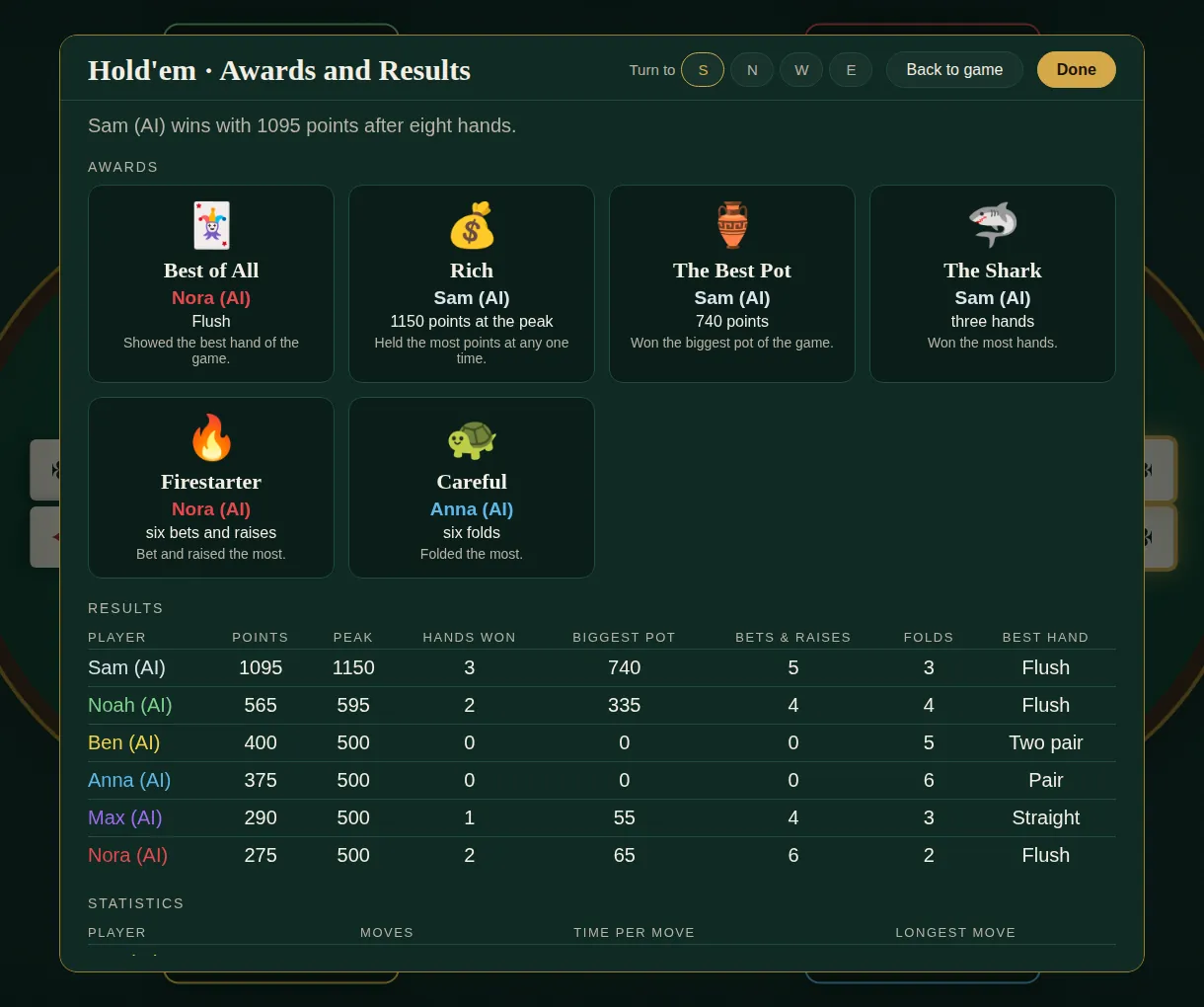
When the last hand is played, the board opens the awards: who showed the best hand, who bet the most, whose king never left its square. It's a fun extra for classic games, and the table usually has something to say about it.

Best of All

Showed the best hand of the game.

The Shark

Won the most hands.

Firestarter

Bet and raised the most.

Careful

Folded the most.

Each game picks its own awards. The platform adds moves and time per player, plus ⚡ Quick Draw and 🤔 Deep Thinker for the people at the table. The same window opens again from the Game Viewer for any finished game.

// in your game's summary, one line per award awards: [ mostAward({ id: "shark", icon: "🦈", title: "The Shark" }, handsWon), ]
Real screenshot The statistics window on the board after a game of Hold'em: award cards for Best of All, Rich, The Best Pot, The Shark, Firestarter and Careful, then a table of points, hands won, biggest pot, bets, folds and best hand for six players.
The board after eight hands of Hold'em with six AI players. The window turns to face any edge of the table.

The lobby

Real life at the table, handled for you.

Phones run out of battery, people leave early, a friend joins halfway through. The platform deals with all of it, so a game only plays the game, and every game behaves the same way.

Open seat
Open seat
Open seat
Open seat
Open seat
Open seat
Scan to join
2 watching

Join by QR code

One code for everyone at the table. When no seat is free, the board and the phone say so.

Seats and colours

1 to 8 seats around the edges, each with a name and colour; the board turns toward each side. One seat is a solo game.

Away phones keep their seat

A locked screen or a dead battery doesn't end the game. The seat waits, then the table decides.

Exchange a player

Mid-game, hand a seat to someone at the table, a remote friend, a watcher or an AI. The game carries on.

Remote invites

A link, optionally with a name. The browser connects straight to the table over WebRTC.

Watchers

Friends can follow along without a seat. Tap the eye to see who's watching, let them play, or remove them.

Rejoin by name

Left by accident? Scan again with the same name and you're back in your seat.

Logs, replay, viewer

Every game is logged and replayed to check it. The board's Game Viewer walks through each move.

For game developers

You bring the idea.
The platform brings the table.

The platform is made for agentic coding. You focus on the game idea, its design and the experience at the table; your AI agent writes the code. A game is a folder: a manifest, pure TypeScript rules, and optional board and phone screens in plain JavaScript. The developer guide is written for language models first, so your agent can read the contract and build a complete game.

Claude · extra-games
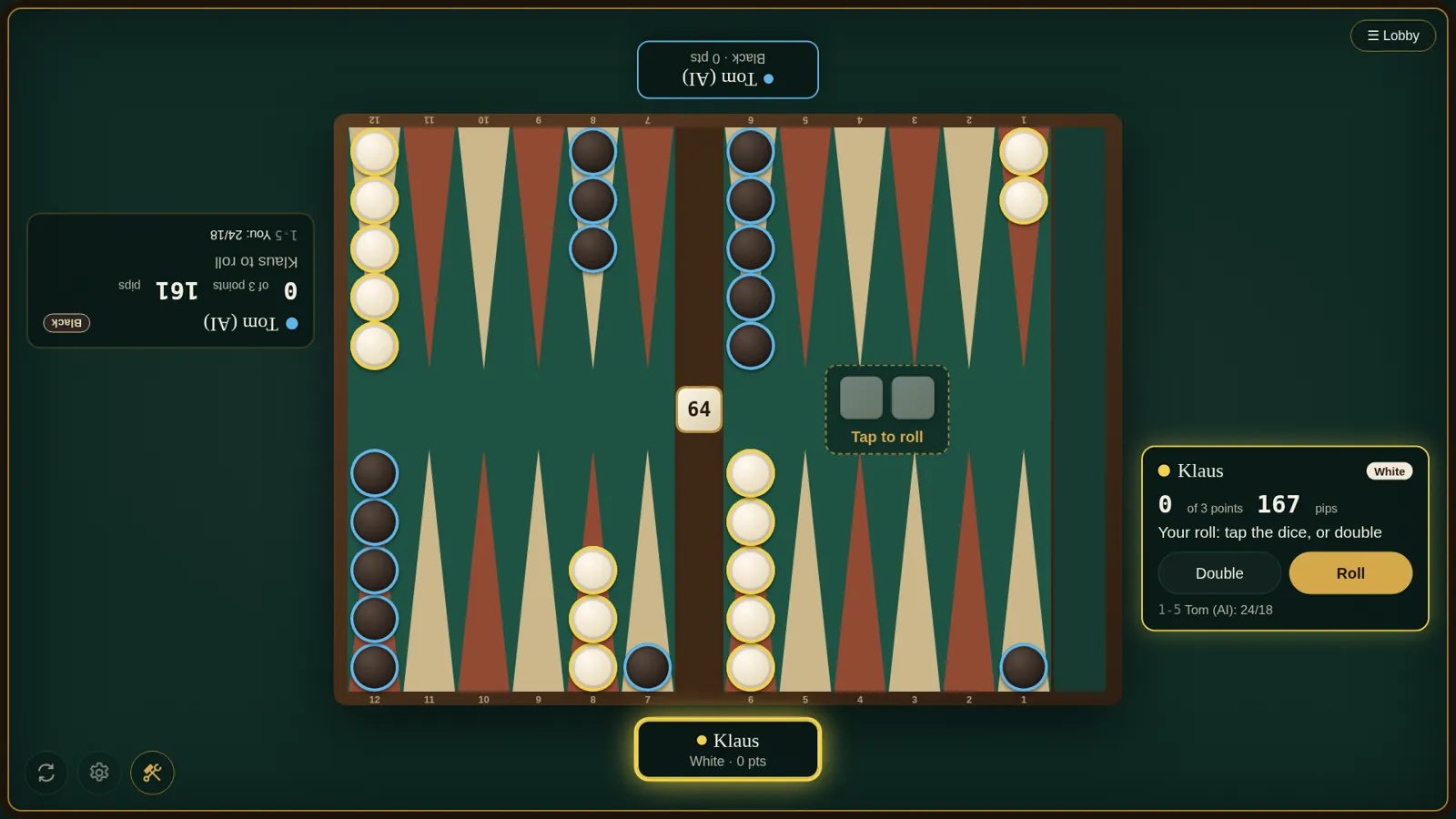
Backgammon on the board: checkers, dice, and each player's panel
One prompt · no supervision

“Create a backgammon game for the game platform.”

That was the whole prompt. Claude read the developer guide and came back with a working Backgammon, without anyone looking over its shoulder. A few hours of polish later it plays matches to 100 points with the doubling cube and the Crawford rule, its checkers move by tap or by drag and drop, and its strongest AI players come from wildbg, Carsten Wenderdel's open-source neural-network engine, which Claude ported to TypeScript and tested against its own AI. Everything else it simply gets from the platform:

  • AI players, six strengths
  • A touch board: tap or drag
  • Private phone decks
  • Remote players and watchers
  • Timers, pauses, exchanges
  • Logs, replay and statistics

The session on the left is a re-enactment; the prompt is the real one.

Five steps from idea to table

Tell your agent
1

Start from a working repository

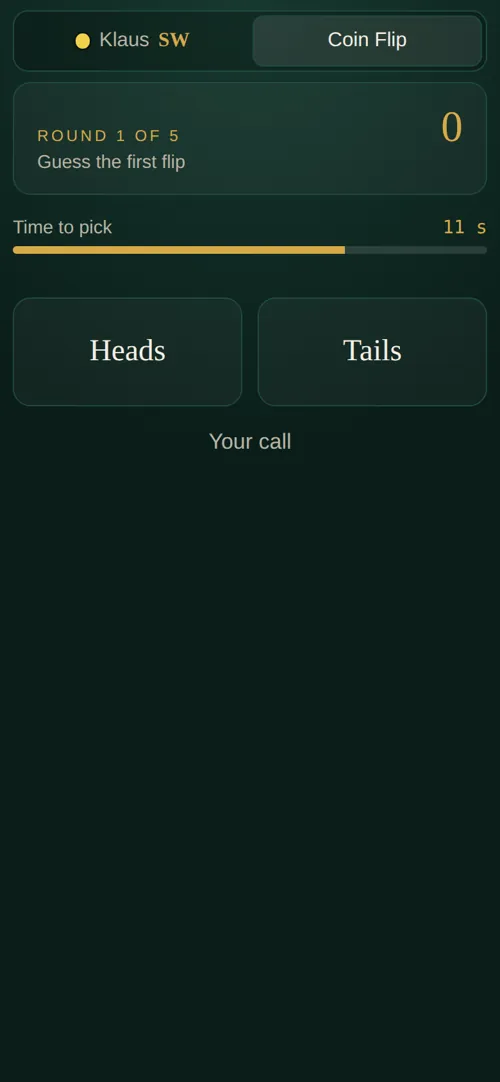
Copy extra-games: five complete games, tests that run them on the real platform, and CI. Or start inside the platform from games/coin-flip, the smallest complete game.

2

Let your AI read the contract

llms.txt points to the developer guide: the manifest, every rules hook, what the platform does with players, and a checklist. One file holds it all: llms-full.txt.

3

Write rules, not plumbing

Rules are pure functions on a JSON state: setup, onIntent, view, boardView, isOver, plus an AI. Randomness comes from the context, so every game can be replayed and checked.

4

Play it, even without a phone

Run a table on your laptop. Play from the board puts a player's deck beside the board, AI players take the other seats, and the Game Viewer shows each move if something looks wrong.

5

Bring it to every table

Your repository's games/ folder becomes an extra-game repository: clone it into a local table, or let a game service install it on its tables.

import { defineGame } from "@game-table/sdk";

// Coin Flip, shortened: everyone guesses, then the coin flips.
export default defineGame<State>({
  setup(ctx, settings) {
    const seats = ctx.seats.map((s) => s.seat);
    const rounds = Number(settings.rounds);
    return { round: 1, rounds, seats, guesses: {}, scores: {} };
  },

  onIntent(state, seat, intent, ctx) {
    if (intent.name !== "guess") return { reject: "unknown move" };
    const guesses = { ...state.guesses, [seat]: intent.payload };
    const next = { ...state, guesses };
    return allGuessed(next) ? flip(next, ctx) : { state: next };
  },

  // Each phone sees its own seat; the board sees what is public.
  view: (state, seat) => ({ myGuess: state.guesses[seat] ?? null }),
  boardView: (state) => ({ round: state.round, scores: state.scores }),
  isOver: (state) => (state.round > state.rounds ? summary(state) : null),

  // AI players read the same view a phone gets, nothing more.
  ai: (view, seat, ctx) => ({
    name: "guess",
    payload: ctx.random() < 0.5 ? "heads" : "tails",
  }),
});

// flip() draws from ctx.random(), never Math.random():
// every game replays exactly, and the platform checks it.
// games/coin-flip/manifest.json (shortened)
{
  "id": "coin-flip",
  "name": "Coin Flip",
  "version": "2026.10.23.1",
  "players": { "min": 1, "max": 8 },
  "turnModel": "simultaneous",
  "seatLayouts": [2, 4, 6, 8],
  "dynamicPlayers": true,
  "settings": [
    { "key": "rounds", "type": "int", "min": 1, "max": 20, "default": 3, "label": "Rounds" }
  ],
  "ai": { "supported": true, "options": [] },
  "simulation": { "supported": true, "headless": true }
}

// The board shows the settings; the lobby checks the player count.
games/
└── yahtzee/
    ├── manifest.json     id, players, seats, settings, AI options
    ├── rules.ts          pure, deterministic rules + AI
    ├── board.js          the shared touchscreen (optional)
    ├── deck.js           each player's phone (optional)
    ├── how-to-play.md    rules for players, shown on board and phone
    └── assets/           images, sounds

// UI modules: mount(root, ctx) → { update(view, events, info), destroy() }
// No build step: TypeScript runs natively on Node 26.

You prompt your AI agent

  • Your game idea and its rules
  • What each phone and the board may see
  • AI players, in one style or several
  • The look and feel of the board and the phones
  • Rules for players to read

The platform does

  • Lobby, seats, names, colours, the QR code
  • Joining, leaving, away phones, exchanging players
  • AI scheduling at the board's pace, pauses, timers
  • The sling: cards pushed off a phone come onto the board at that seat
  • Remote players and watchers over WebRTC
  • Logs, replay checks, the Game Viewer, statistics, simulations

Demo game

Make the table your own: Mexican Train.

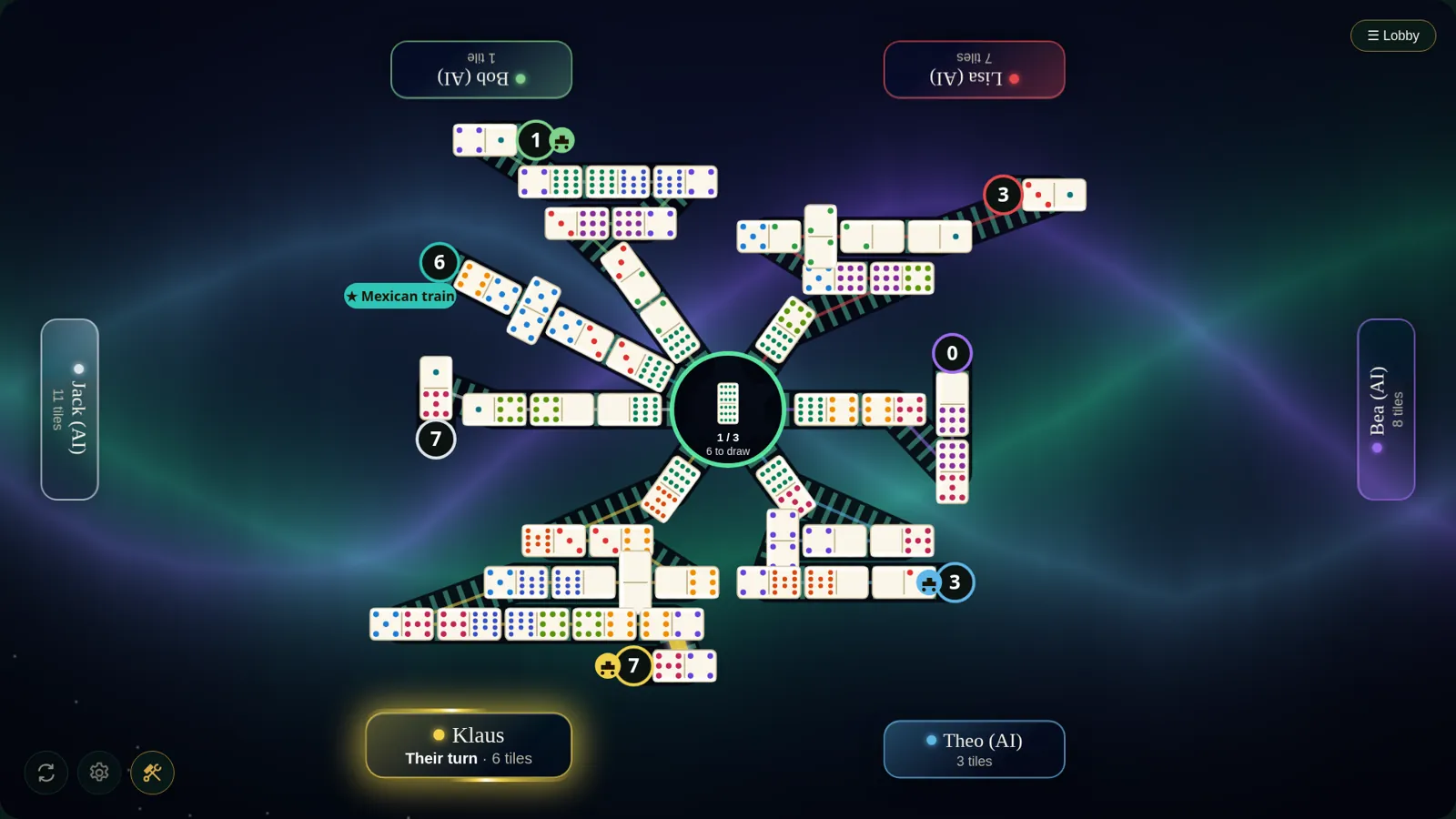
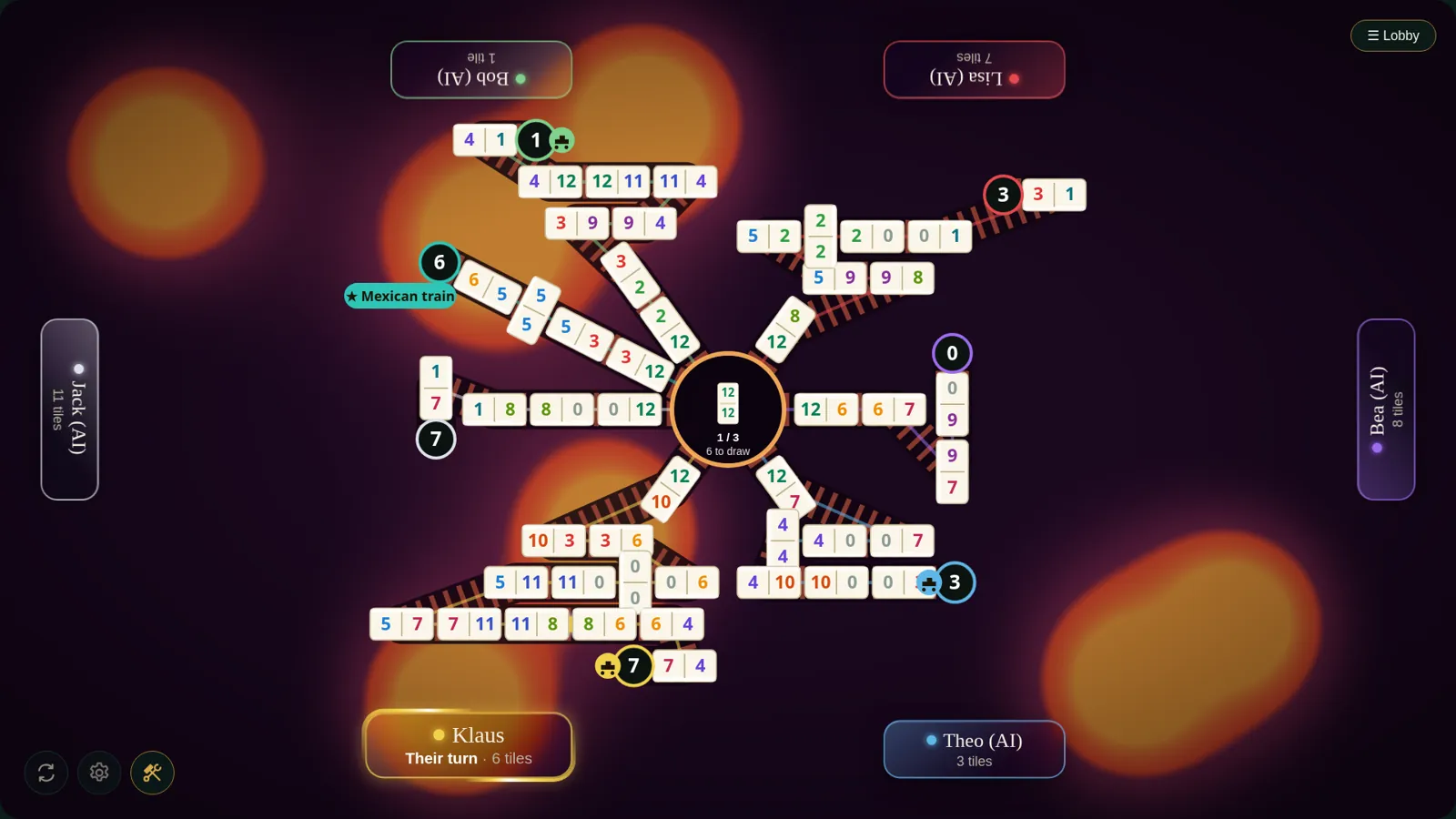
Mexican Train, in extra-games, is a demo for developers: a game that changes nearly everything you see and hear, and still lets the platform handle the lobby, the seats and the players. Copy any part of it into your own game.

The Mexican Train board: trains of dominoes run out from a glowing hub over an animated aurora, with glass seat plates around the edgeThe same moment with the Lava lamp background and tiles showing numbers instead of pips
Aurora, coloured pipsLava lamp, numbers · the same game, two choices in the board's settings
  • A board that sizes itself. A train can grow to 47 tiles: it bends into rows, and the tiles shrink only as far as they must.
  • Animated backgrounds. Aurora, lava, plasma, fireflies, a starfield or clouds, drawn by the game itself; or a new one each round.
  • The platform's seat plates, restyled. Glass you can see the background through, glowing on the player whose turn it is.
  • Its own sound and music. Tile clacks and a train whistle, and tunes the game composes as it plays.
  • Rule options and table preferences. House rules picked when the game starts; tile faces, background and music changed any time from the board's settings.
  • Its own phone screen. Your hand, the trains you may play on and two taps to play, in the platform's phone layout.

Platform feature

The sling: push a card off your phone, onto the table.

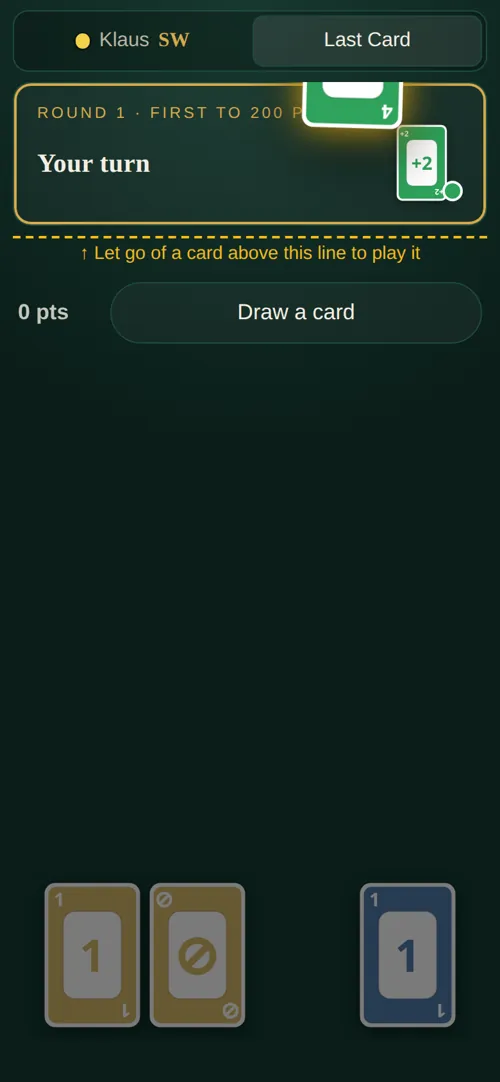
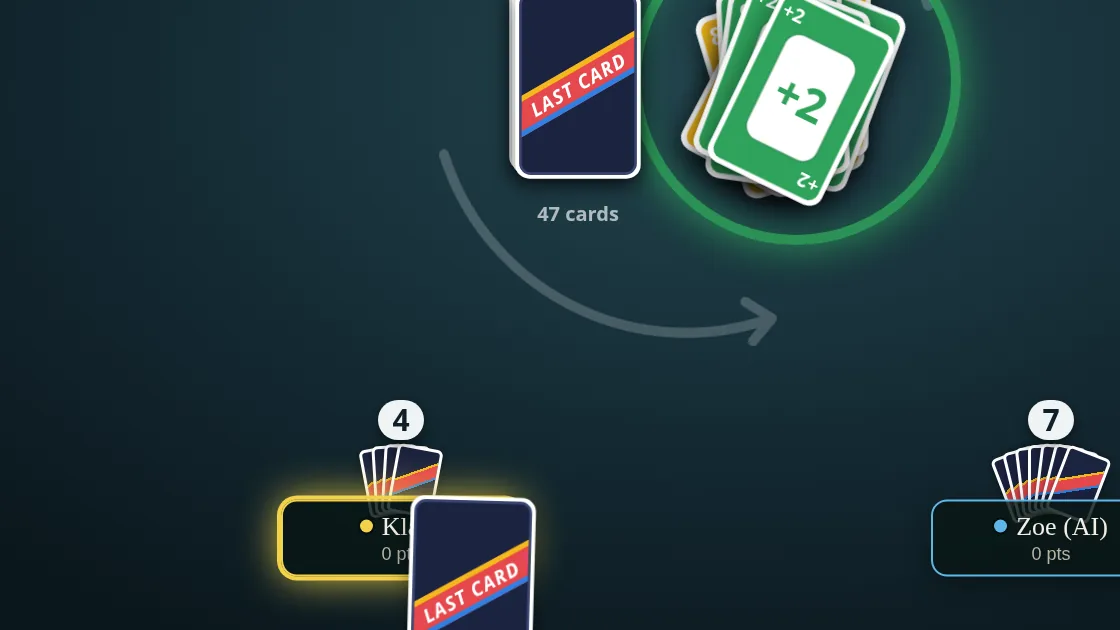
A game can let players push a card up and off the top of their phone. While the finger is still on the glass, the board shows the card coming in at that player's edge; let go and it flies onto the pile. Drawn cards fly the other way. Last Card, a game in extra-games, is built on it.

7 7 ● Klaus Your turn
  1. 1Push a card off the top of your phone.
  2. 2The board shows it at your seat while your finger is down.
  3. 3Let go: it flies onto the pile.
  • Live, not after the fact. The phone sends the gesture as it happens, and every board, at the table or remote, shows the card at the right seat and the same angle.
  • Push, flick or let go. Off the top of the phone, flicked left, middle or right, or let go above a line under the game's status.
  • The rules still decide. The game says which cards may go and what a move means; a card that doesn't fit peeks out and bounces back with the reason.
// deck.js: anything with data-sling="<id>" slingDeck(hand, ctx, { canSling: (id) => fits(id) || "Doesn't match", onSling: async (id) => (await ctx.send("play", { id })).ok, }); // board.js: at the seat, then onto the pile const sling = slingBoard(root, { render }); gesture(seat, data) { sling.gesture(seat, data); }
Klaus's phone in Last Card: a yellow card pushed half off the top of the screen, the rest of the hand below The board at the same moment: the back of the card slides in over Klaus's seat plate, below the draw pile and the discard pile
The real thing in Last Card: one moment on Klaus's phone and on the board, the same card at the same seat.

One player

Not every table needs a crowd: FM-1 Synth.

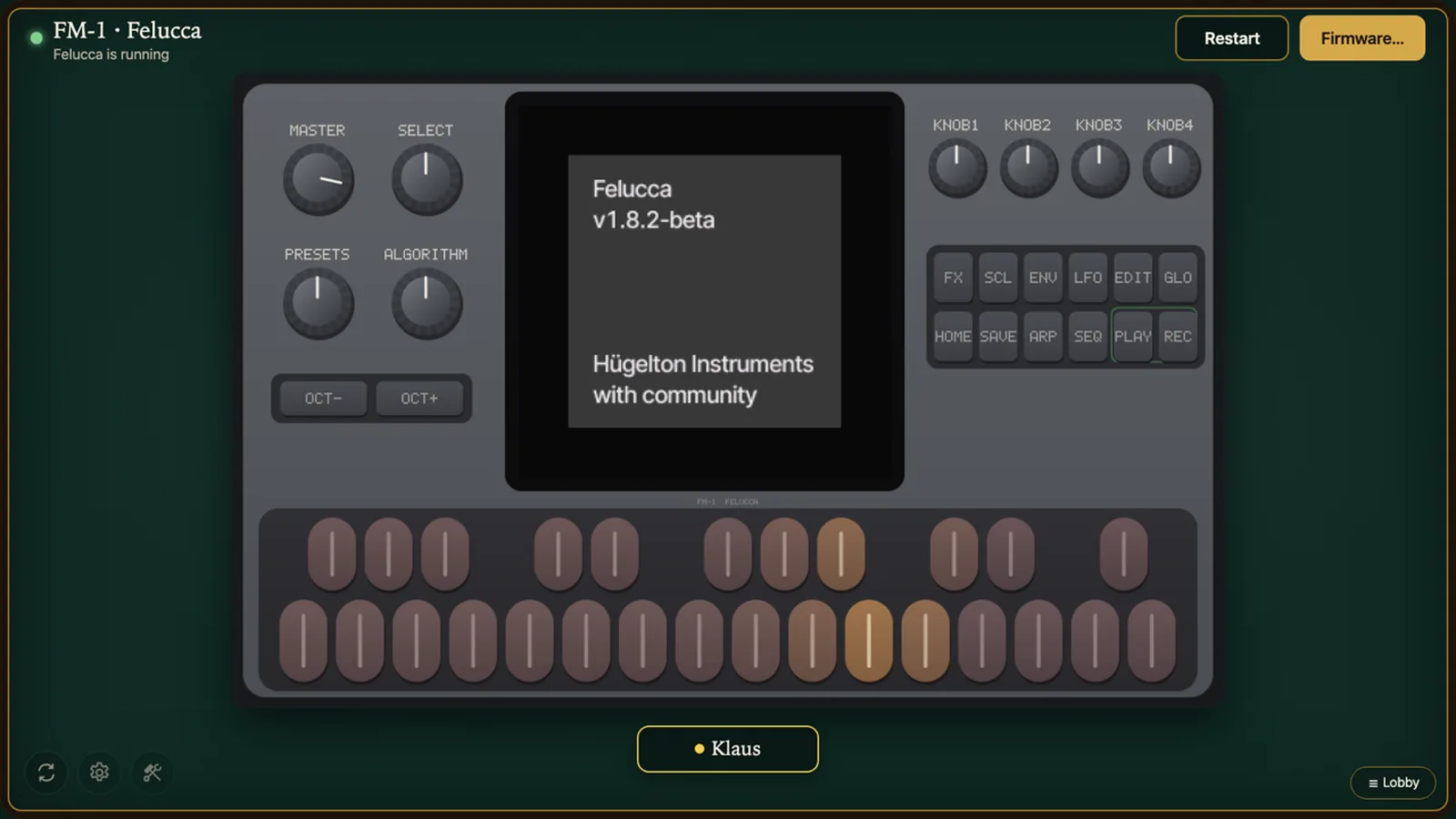
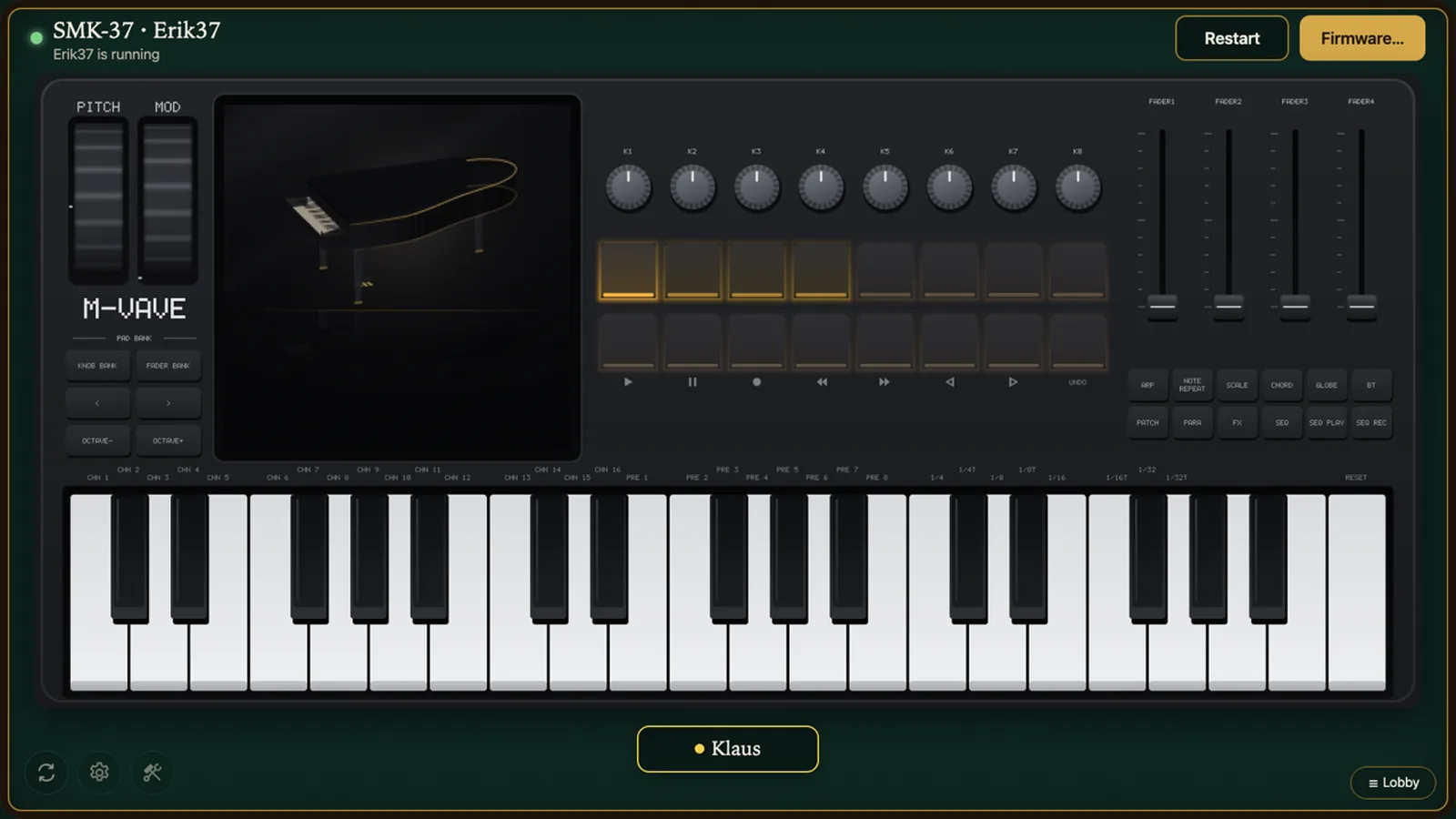
A board you can touch with every finger is an instrument, too. FM-1 Synth puts a pocket synthesizer on the table for one player, in a seat of its own. It is a game like any other to the platform: the lobby, the QR code, the seat plate and the phone work as for Chess, so a single-player idea needs no platform of its own.

The M-VAVE FM-1 on the board: knobs, a screen running the Felucca firmware, buttons and two rows of keys, with the player's seat plate belowThe same board with the SMK-37: pitch and mod wheels, the screen, knobs, pads, faders and 37 keys
The FM-1The SMK-37 · switch between them any time
  • One seat. A game may take a single player; the table gives it one seat at the south, and the board turns north for a player on the other side.
  • Played by touch. Keys, knobs, buttons, pads and faders, with as many fingers as you like. No keyboard, MIDI cable or app.
  • The real firmwares. The community's firmwares run unchanged; each is downloaded from its author's site when it is picked.
  • Your phone is the remote. It shows what runs, lists the firmwares, switches between the two devices and ends the session.
  • An emulator in the board. fm1-emu by Joakim Eriksson emulates the FM-1's processor, screen, keys, knobs and sound in WebAssembly; the game runs it on the table's board.
  • Open source. The game and its copy of the emulator are in synth-game (MIT). The packages for Windows, macOS and Linux add it at every start, like extra-games.

A second screen

For electric guitar players: GE150 Pro.

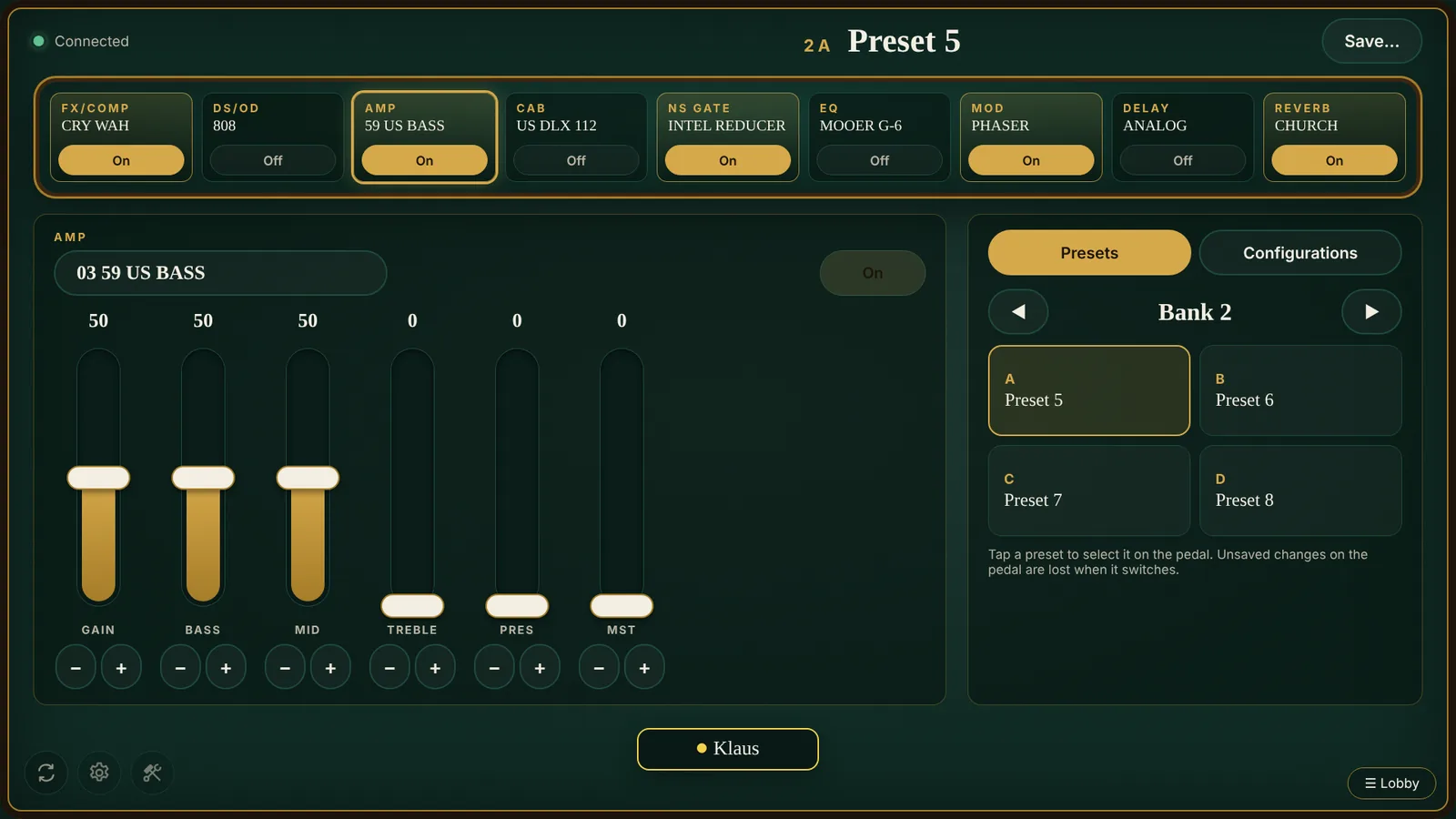
Plug a Mooer GE150 Pro multi-effects pedal into the table's computer and the board becomes its editor, big enough to read from where you stand with the guitar. Your phone is the second screen: it sits on the music stand and does what you need between two songs, while your hands stay on the strings. It is an example of what a phone can be besides a hand of cards. The game has its own public repository: github.com/klaushofrichter/ge150pro-game.

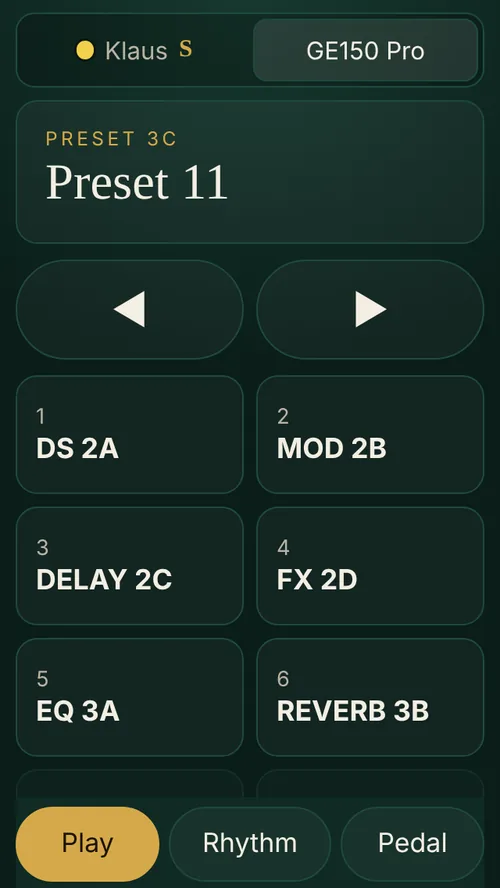
The phone's Play tab: the current preset 3C, buttons for the previous and next preset, and quick slots holding saved sounds: DS 2A, MOD 2B, DELAY 2C, FX 2D, EQ 3A, REVERB 3B The board: the pedal's signal chain of nine modules across the top, the faders of the AMP module, and the four presets of bank 2
The phone and the board with the same pedal, from the game's browser test with a simulated pedal.
  • Needs the pedal. A Mooer GE150 Pro (firmware 2.1.2 or newer), connected by USB to the computer that runs the table's board. The guitar plays through the pedal as always; the table only controls it.
  • The board is the editor. The signal chain, each module on or off, its model and every parameter on a large fader; banks and presets; save a sound to its slot (it asks first).
  • The phone is the second screen. Play: the current preset, the next and previous, eight quick slots. Rhythm: the pedal's drum machine and a click from the table's speakers with tap tempo. Pedal: the connection and your saved configurations.
  • One player. Like FM-1 Synth, it takes the table's single seat; the lobby, the QR code and the phone work as for any game.
  • Open source, unofficial. The game, its pedal library and its browser tests are in klaushofrichter/ge150pro-game (MIT), on the hosted service for the tables that tick it in the console. Not affiliated with or endorsed by Mooer; "Mooer" and "GE150" are trademarks of their owners.

Test and debug

Test without players. Debug with your AI.

You don't need four friends to find a bug. Fill every seat with AI players and let the games run, then hand the log to your AI and point it at the move that went wrong.

Simulations

Games with nobody at the table

Run whole games with only AI players: no board, no phones, no people. Twenty games of Hold'em with six AI players finish in under a second, and a seed makes a run repeat exactly.

# the board control API
POST /api/v1/simulation
{ "gameId": "holdem", "players": 6,
  "games": 20, "seed": 42 }

# every game, every player count
node scripts/soak.ts 100
Game logs

Logs your AI can read

Every game, played or simulated, is saved as a zip: every move, the state at the end, and a README.md that explains the format to whoever opens it. Each game is replayed when it ends to check it reaches the same state.

$ node scripts/game-log.ts \
    run.zip moves 40-42
  #40  L42   +8.0s   AI 1   raise
  #41  L43   +8.0s   AI 3   call
  #42  L44   +8.0s   AI 5   call
$ node scripts/game-log.ts \
    run.zip move 42
  … the intent, events and the state
    before and after the move
Game Viewer

Point at the exact move

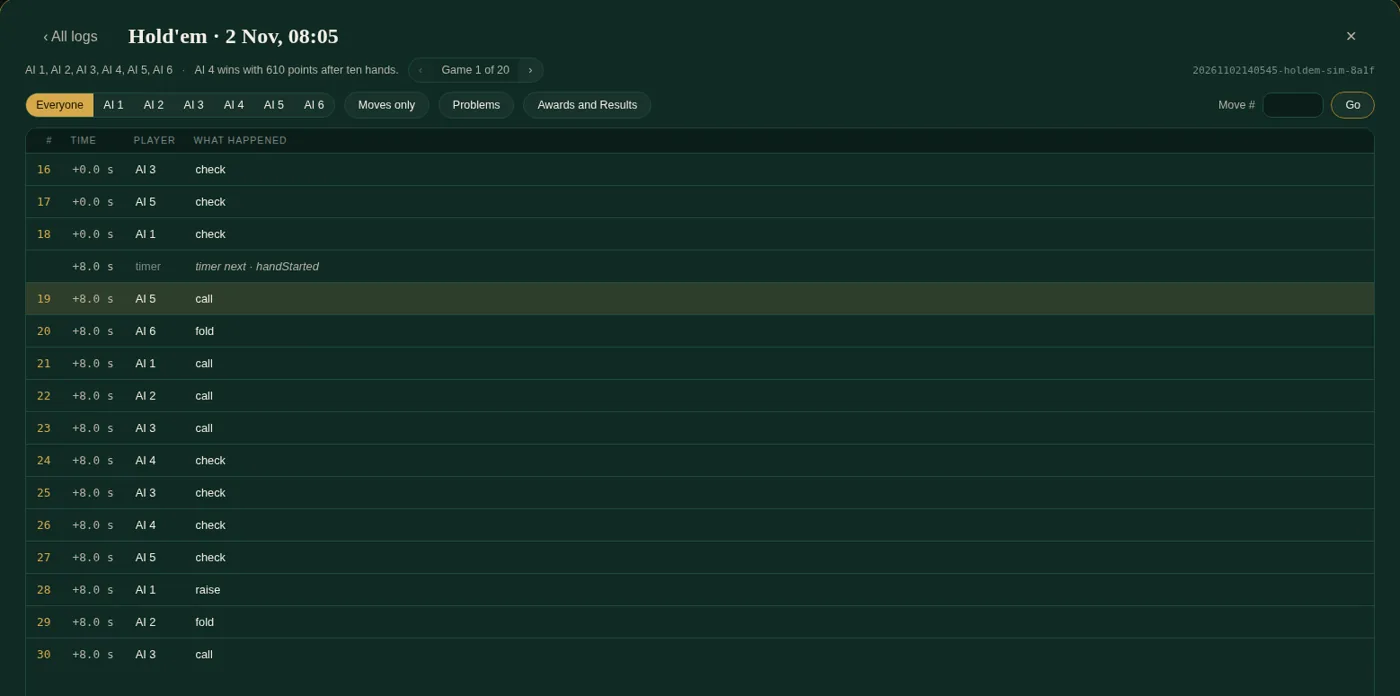
The board's Game Viewer lists every move of every finished game, simulations included. Open a move and copy its reference, then ask your AI about it:

Read the log 20261022213307-holdem-sim-68f1, game 1 #42. Why did AI 5 call there?

Everything the board can do is also an HTTP call, including each finished game's moves and statistics, so an agent can start games, read the history and check its fix by itself.

Real screenshot The Game Viewer on the board: game 1 of 20 in a Hold'em simulation with six AI players at move 19, where a timer starts the second hand at +8.0 s; every move numbered with the player and what happened, filters by player, moves only and problems, and a field to jump to a move number.
The Game Viewer on the board, showing game 1 of a 20-game Hold'em simulation with six AI players, where the second hand starts. Simulated time moves on with the game's timers, not the clock.

Game repositories

Games from anywhere on GitHub.

Any repository with a games/ folder can bring games to a table. These work with the platform today.

klaushofrichter/games-serviceThe platform, with its built-in games
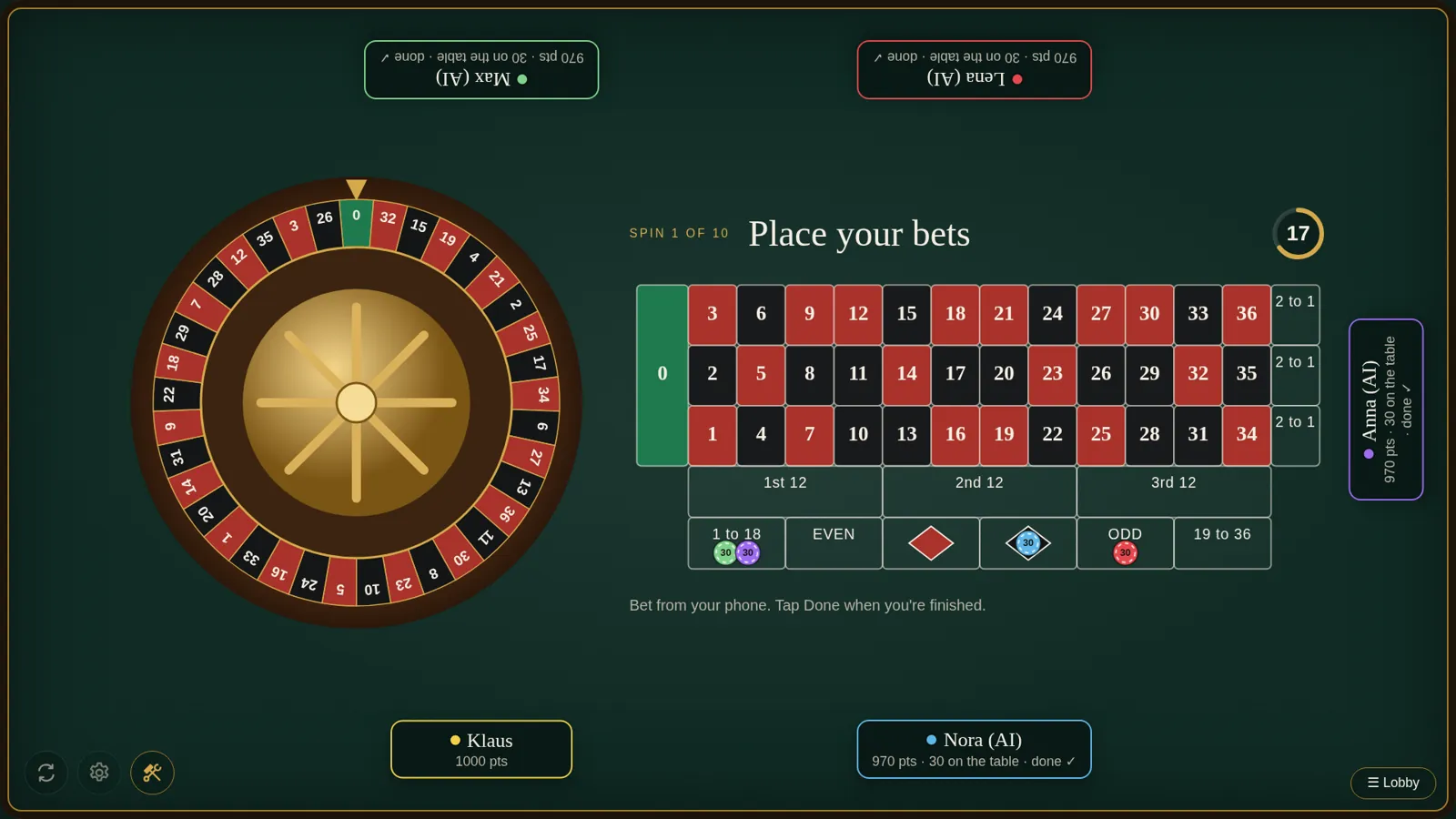
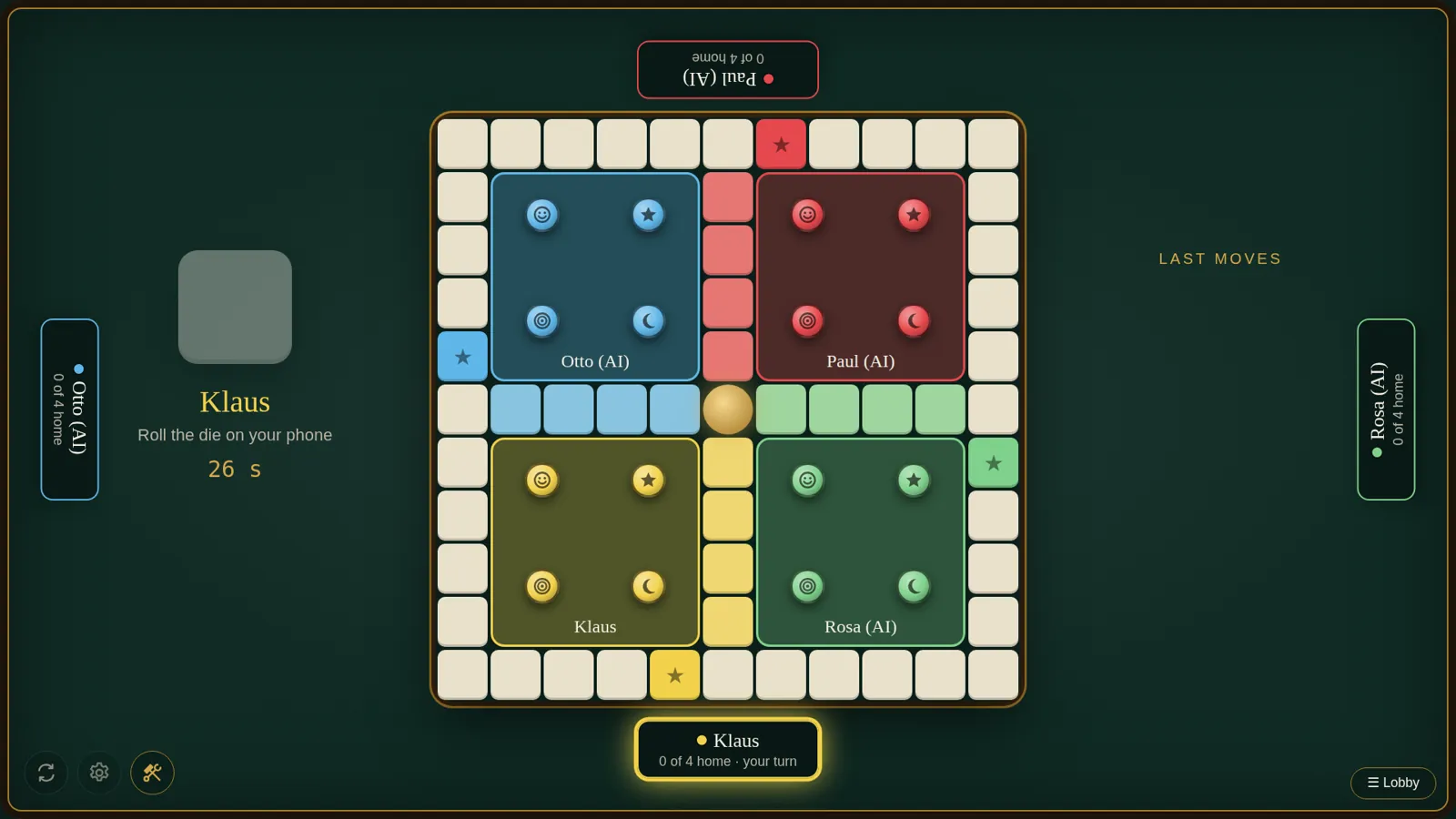
RouletteHold'emPachisiCoin Flip
GitHub →
klaushofrichter/extra-gamesExample game repository, MIT
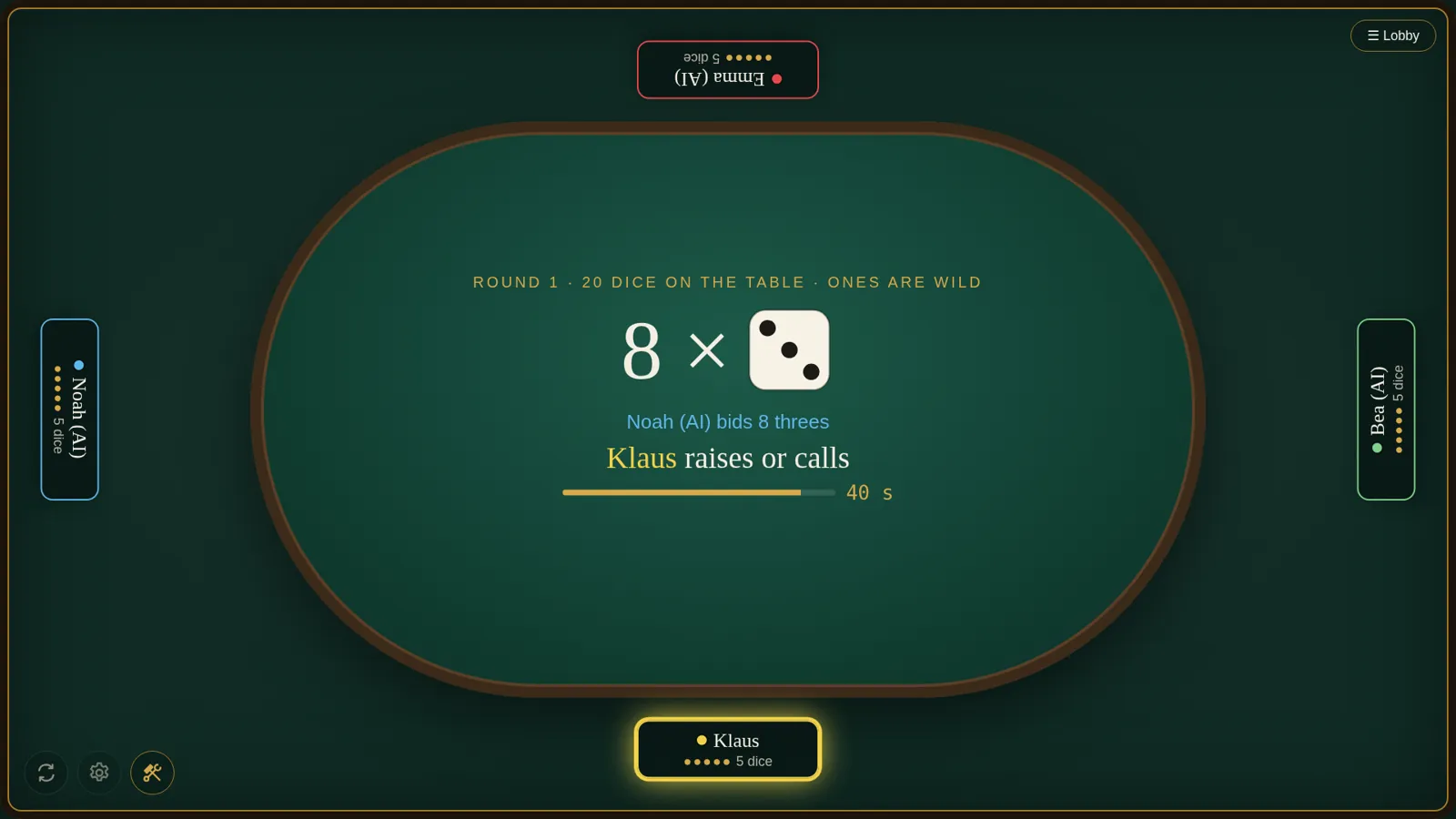
ChessLiar's DiceBackgammonMexican TrainLast Card
GitHub →
your-name/your-gamesBuilt a game? Tell us about it
Open an issue with a link to your repository and we'll list it here.
Add yours →

Play at home

Download it, start it, play.

One package for your computer, with everything inside: the table, the built-in games and its own Node.js. It needs no Docker and no account with us. At the first start it fetches the games from GitHub, your private game repositories too if you name them, and opens the board in the browser. Everyone joins with their phone on the same network as that computer.

Download from GitHub

Or let your AI agent install it. It follows the install guide for your system, and you only sign in to GitHub when asked:

Read https://games.skylar.technology/llms.txt and install the Game Table package on this computer by following the install guide for its system.

Players at your table only, out of the box. The packages don't connect to a game service with a public DNS name, like https://games.skylar.technology, so nobody can join from elsewhere. That takes configuration: start the same installation with an access code from a game service (--code), or run your own game service on a public DNS name (see Every table, one console). The packages aren't signed yet, so Windows and macOS ask once whether to open them; the guides show where to click.

Or with Docker

A table on any computer, in three commands.

The table runs in Docker on a computer on your home network. Open the board in a browser, on a touchscreen if you have one, and everyone joins with their phone. No cloud service, no DNS entry and no HTTPS needed.

Docker with ComposegitPhones on the same networkA touchscreen, an iPad or a mouse

Games from other repositories, private ones too, are added by cloning them. The runbook has every step, with a check after each one.

No touchscreen table yet? An iPad makes a small game board, good enough to try a game or test your own: in the board's settings, Board on another screen… shows a QR code, the iPad scans it, and the board moves there while the table keeps running on the computer.

Or let your AI agent create new games:

Check out https://games.skylar.technology and read the llms.txt. I want to create a new game and play it on a local table.
your computer
$ git clone https://github.com/klaushofrichter/games-service
$ cd games-service && deploy/local/setup.sh
PUBLIC_URL=http://192.168.1.20:8080
$ docker compose -f deploy/local/docker-compose.yml up -d --build
✔ Container local-table-host-1  Started

# open the board on this computer:
$ open http://localhost:8080/board/
# phones scan the QR code on the board
Touch glass, flush with the top
Display, 1080p or 4K
Linux mini PC, 16 GB
Wooden table frame
In the workshop

The table, with the screen built in.

We're building a real game table: a large touchscreen set flush into the tabletop, with a small Linux PC underneath. Photos and a build guide will be here in a few weeks.

Touchscreen16:9, 1080p or 4K, lying flat
ComputerA Linux mini PC, 16 GB RAM
NetworkThe same network as the phones
SoftwareDebian 12, Docker and a kiosk browser

Want to build your own now? The table PC kit installs Docker, the table and a full-screen kiosk that opens the board at boot.

Table PC kit on GitHub →

Run a game service

Every table, one console.

A table plays fine on its own. Add a game service and your tables reach past the room: it runs on a server with a DNS name and HTTPS, and its admin console looks after every table that connects to it. This page comes from one.

A server with DockerA DNS nameHTTPSGoogle sign-in for admins
  • Remote players from anywhere. An invite link brings a player or a watcher to your table from any browser, not just from your home network. The service introduces them, then they connect straight to the table.
  • Many tables, approved by you. A new table shows a pairing code on its board for you to approve, or starts with an access code you issued: a token for one table, valid for a week, a year or for good. Disconnect a table, or revoke its code, at any time.
  • The games each table gets. Add extra-game repositories from GitHub, and tick which tables get them, one by one or with their access code.
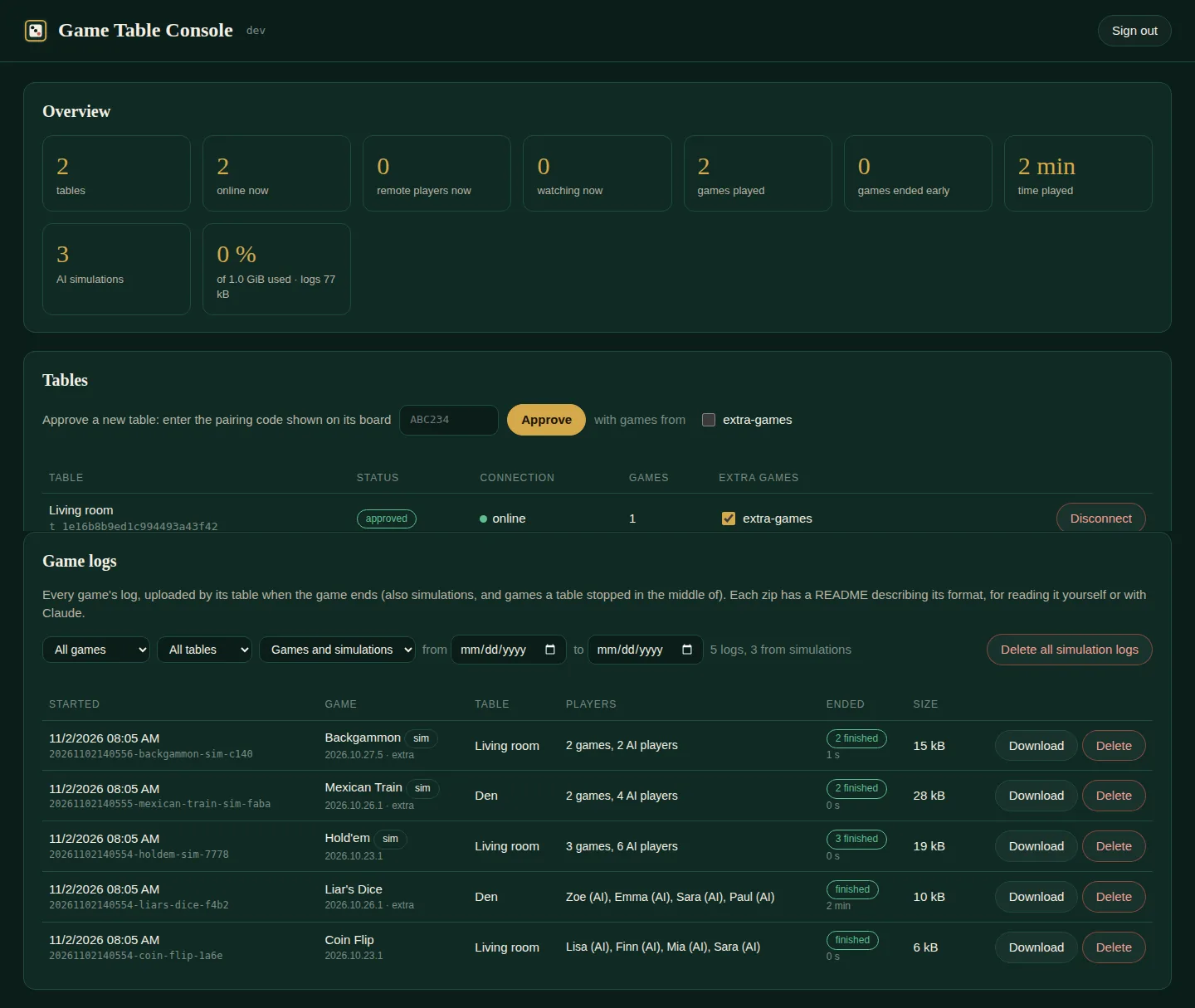
  • Game logs for analysis. Every game and simulation sends its log to the service. Filter by game, table and date, download the zips, or give a pipeline or a Claude session a download token. You choose how long logs are kept.
  • This website. The service serves this page, the developer guide and llms.txt.
  • A public host, on request. games.skylar.technology can host other people's tables too: on request it issues an access code, a token for your table, and your installation joins with --code. Ask on GitHub. It's offered as is, with no guarantee of service.
The admin console: an overview, two tables online, and the logs of their games and simulations with filters and Download buttons
The admin console: two tables, the Living room approved by its pairing code and the Den by an access code, and the logs of their games and simulations (access codes and repositories are further down, left out here).